


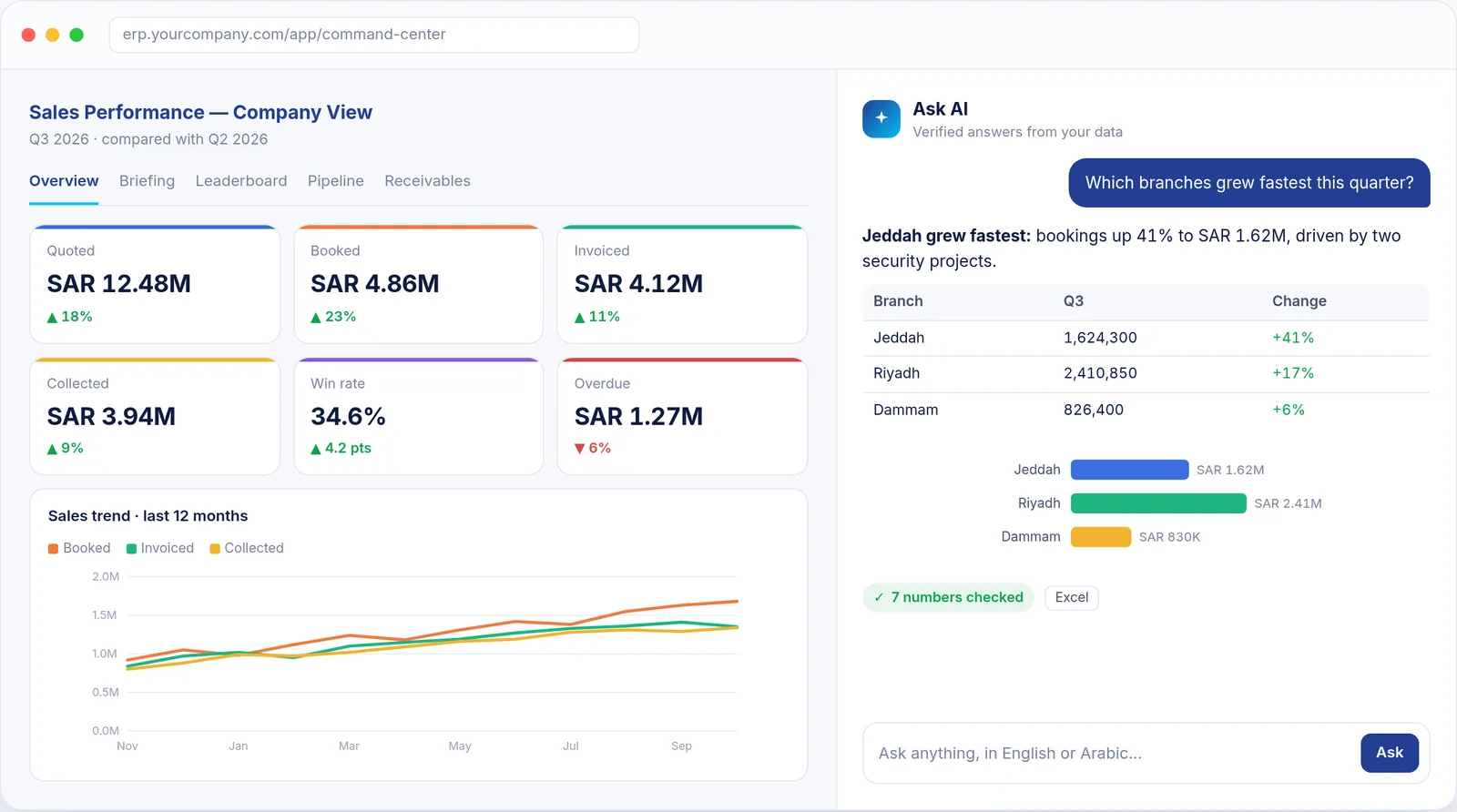
It's the last week of the quarter and the CEO asks a simple question: are we going to make the number?
The answer exists. Every quotation, order, invoice and payment is already in ERPNext. But getting it out means exporting three reports, reconciling them in a spreadsheet and waiting for someone in finance to confirm which figure is right. By the time the answer arrives, the week is over.
Command Intelligence closes that gap. It is an AI analytics layer we built for ERPNext. Managers ask questions in plain English or Arabic and get verified answers with tables and charts. Every time they open it, a briefing ranks what needs attention. And a command center shows the whole sales and cash position on one screen.
The problem isn't data. It's the distance between data and a decision.
Most companies running an ERP are not short of data. They are short of time between a question and a trustworthy answer. The symptoms are familiar:
- Reports are exported and stitched together by hand, so every answer is a small project.
- Problems are found weeks later: an order never invoiced, a quotation that quietly expired.
- Different reports give different numbers, so meetings start with arguing about which one is right.
- Access is all-or-nothing: either everyone sees everything, or managers wait for someone who can.
Command Intelligence runs inside ERPNext, on the data you already have. There is no separate data warehouse to feed. It has four parts.
1. An analyst you can ask, in English or Arabic
The centrepiece is a conversational analyst, built on Anthropic's Claude and placed directly in the ERP. Managers type the question the way they would ask a colleague:
- "How did sales go this month compared with last month?"
- "Which customers owe us the most, and how much of it is overdue?"
- "Which sales people account for the biggest drop, and what should I prioritise today?"
- "How many months can we run on the cash we have?"
The analyst decides which data to look at: dashboards, receivables, payables, the team leaderboard, the report library or individual ERP records. It then answers the way a good analyst would. The bottom line comes first, then the supporting figures, then why it happened and what to do next.
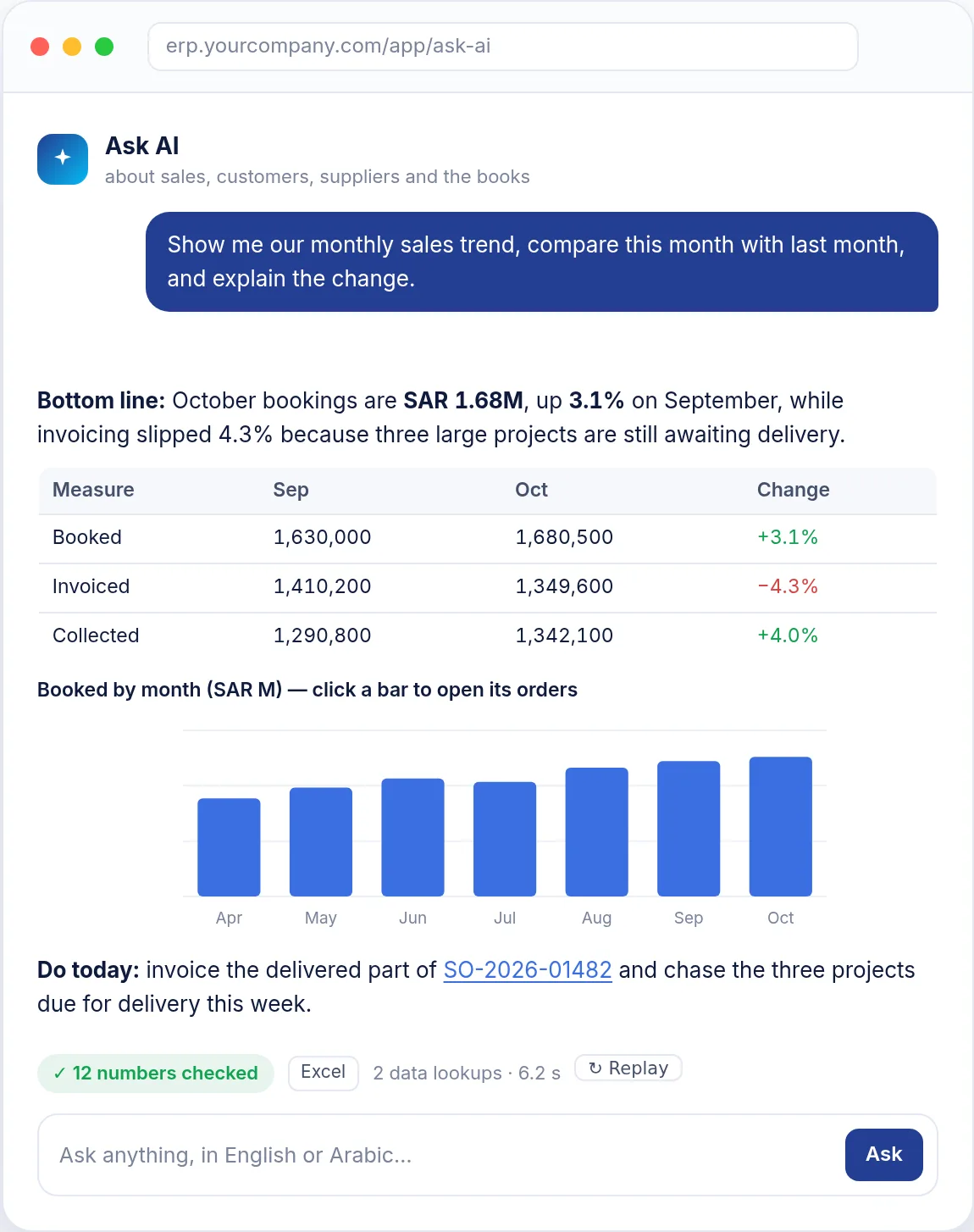
Every answer is built to be used, not just read:
- Charts are clickable. Click a bar to open the exact orders or invoices behind it.
- Tables download as Excel in one click.
- Document numbers are links to the actual quotation, order or invoice.
- Follow-up questions keep their context, so a manager can drill from the whole company to a branch, a sales person, a customer or a single deal.
Every number is checked
An AI answer is only useful if you can trust it, so trust is designed in:
- Each figure in an answer is compared with the data the AI actually retrieved. The answer carries a badge, either all numbers checked or a warning naming the figure it could not confirm.
- Totals, differences and growth rates are calculated exactly, not estimated, and they use the same definitions as the dashboards.
- When data is missing (no sales targets set, for example), it says so instead of guessing.
- It sees only what the person asking is allowed to see, whether that is the whole company, one branch or one department. It is read-only: it can never change, delete or send anything.
2. A briefing that writes itself
Open the Executive Briefing for any period, branch, team, sales person or customer, and more than 50 business checks run automatically. They cover money and margin, cash and collections, pipeline quality, people, customers, products and data quality.
The results come back as a short list of priorities, ranked by the money at stake, in plain language with the numbers attached:
- "SAR 2.4M of orders older than 60 days is still not invoiced (86 orders)."
- "SAR 1.1M of open quotations expire within 7 days."
- "Average days to pay rose from 38 to 52 for 6 key accounts."
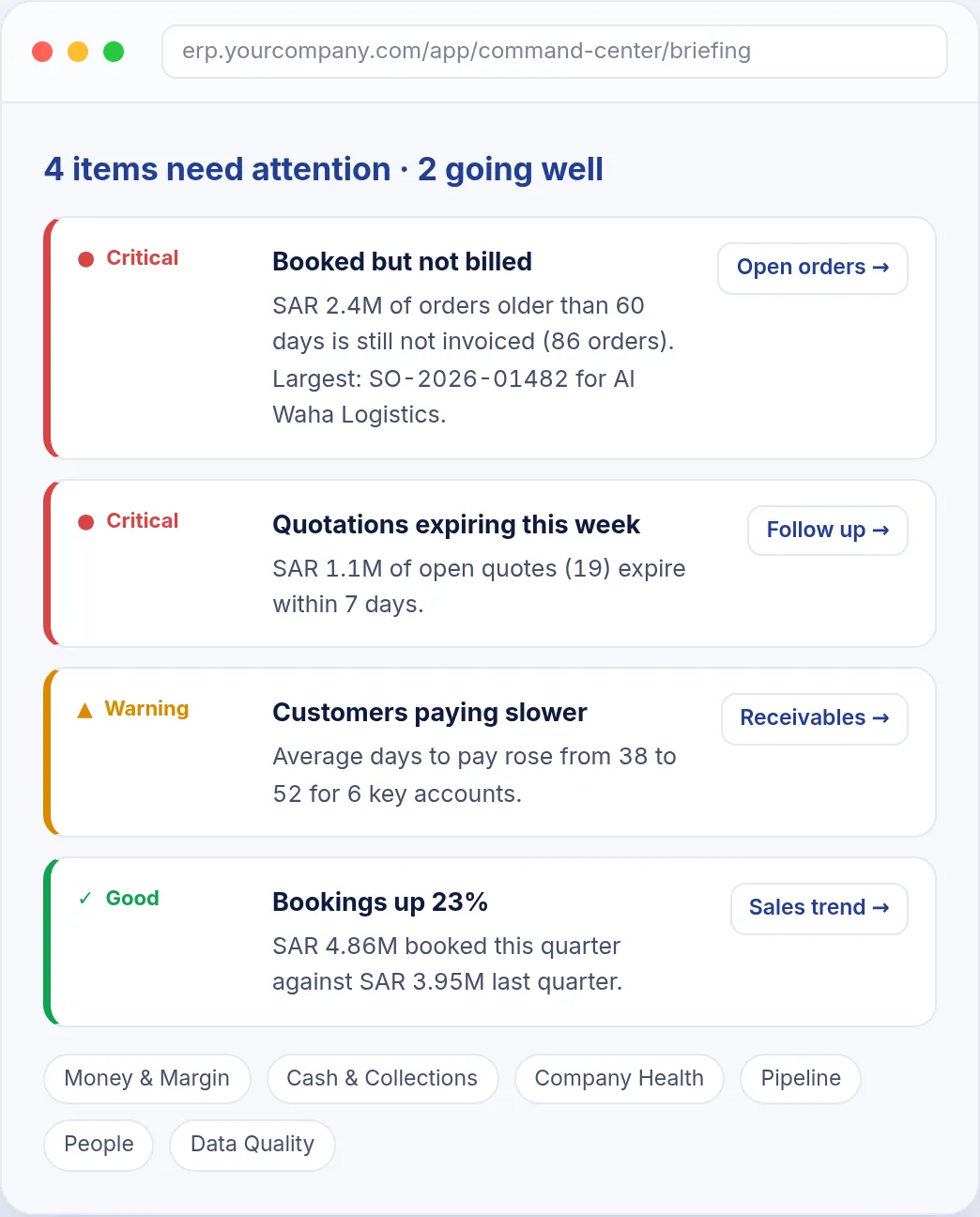
Every finding has its evidence one click away: the exact orders, invoices or customers behind the claim. Every finding also links to the screen where it can be fixed. The briefing reports good news too, such as growth, faster collections and top performers, so it reads like a management summary rather than an alarm list.
3. One screen for the whole sales operation
The Sales Command Center puts every sales question on a single screen, and every figure is compared with a previous period:
- Overview: quoted, booked, invoiced and collected, with win rate, average order, pipeline, a 12-month trend and branch performance.
- Leaderboard: a podium with photos, awards such as top booker, biggest deal and most improved, a race to target, and a TV mode for the office screen.
- Team performance and scorecards: every sales person's leads, quotes, orders, collections, win rate and cycle time.
- Targets and forecast: achievement and pace, by person and branch.
- Pipeline: open quotations by age and stage, expiring quotes, drafts never sent, and stale deals.
- Clients: how much business comes from existing clients versus new ones, repeat rate and dormant accounts.
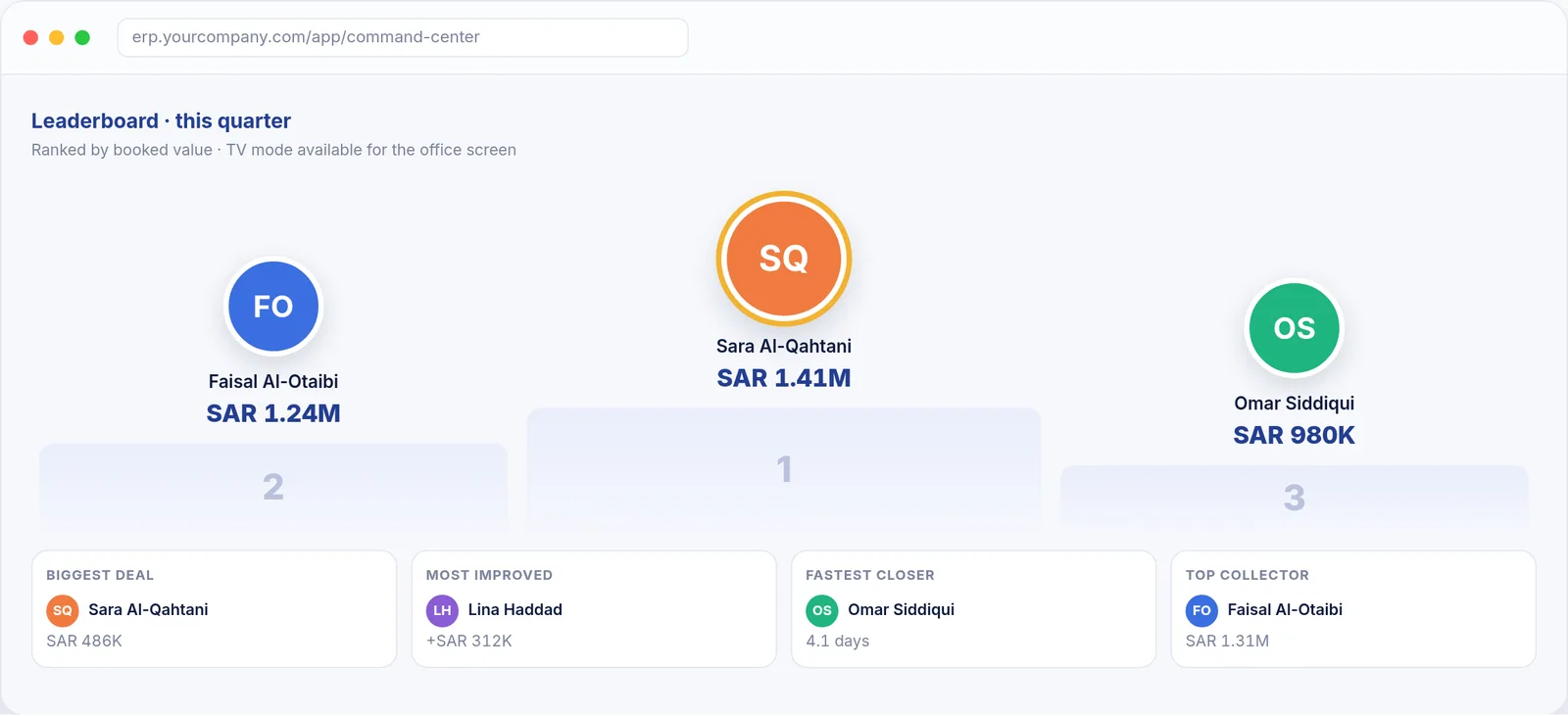
Every tile, bar and number opens the matching ERP list with the same filters applied, so the dashboard is a starting point for action, not a dead end.
4. Know your cash, not just your sales
Sales numbers tell you how the quarter is going. Cash tells you how long the company can keep going. Command Intelligence covers both:
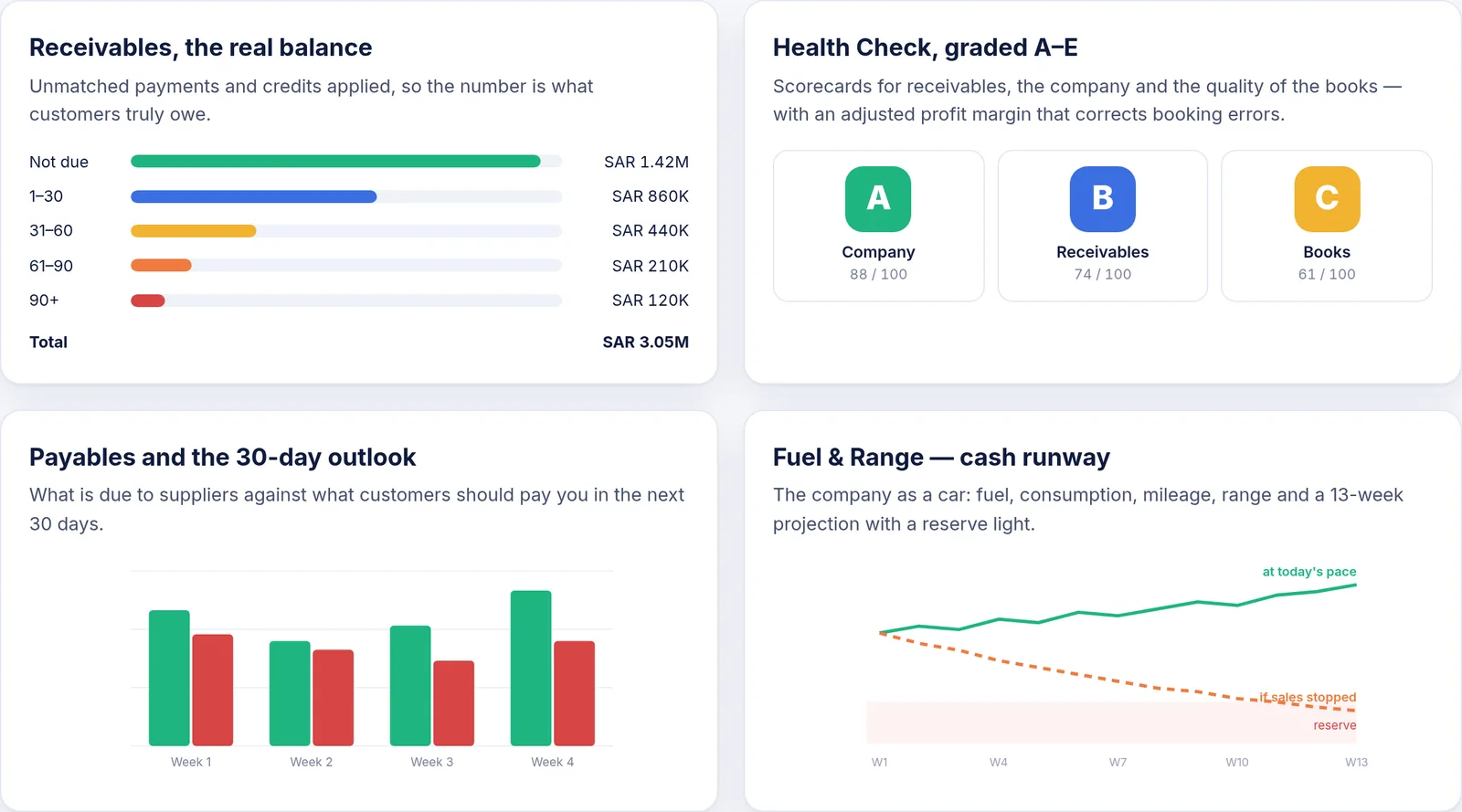
- Receivables shows what customers really owe today, with unmatched payments and credits applied, plus aging, overdue amounts and the biggest debtors.
- Payables shows what you really owe each supplier, a payment schedule, and a 30-day outlook of what you pay against what you collect.
- Health Check grades receivables, the company and the quality of the books from A to E. It also shows a monthly profit and loss with a margin adjusted for common booking errors.
- Fuel & Range explains cash runway the way a car dashboard would. Fuel is cash plus collectable receivables minus payables. Range is how long that lasts at today's pace, and how long if sales stopped. It comes with a 13-week projection and a reserve warning light.
Accurate enough to take to the board
Dashboards lose their value the first time someone finds a wrong number. So every figure in Command Intelligence is recomputed by a separate, independent audit: more than 2,000 checks, with zero differences.
Governance comes built in as well:
- Each role sees its own scope. Leadership sees the whole company, branch managers see their own branch, and single-department views are available where needed. The same rule applies to dashboards, reports, the briefing and the AI.
- Sensitive units can be excluded from all analytics.
- Sales credit lands with the right person automatically, even when the sales team was not filled in on the document.
Around the four core parts sit 20 ready-made analyses: forecast, stuck deals, win/loss by product, discount analysis, lead-source return and more. There are also weekly or daily email digests for management, branches and individual sales people, and instant alerts for big orders and lost quotations. The whole command center also prints as a formatted A4 PDF report.
Before and after
| Before | With Command Intelligence |
|---|---|
| Reports exported and stitched together by hand | One command center, always current |
| Problems found weeks later | Ranked findings every time the briefing is opened |
| Questions wait for an analyst | Ask the ERP and get a verified answer with charts in seconds |
| Different numbers in different reports | One set of definitions, independently audited |
| Everyone sees everything, or nothing | Each role sees exactly its own scope |
Built for teams in Saudi Arabia
Command Intelligence works fully in Arabic. Arabic-speaking users get the whole interface right to left, with Arabic labels, briefings, digests and AI answers, and amounts in Saudi riyals. Managers can ask the analyst a question in Arabic and get the answer in Arabic.
It is built and supported by the Prestige team in Riyadh, Dammam and Jeddah, the same people who implement and support ERPNext for companies across the Kingdom.
See it on your own data
The fastest way to judge an analyst is to ask it a question you already know the answer to. Book a demo and we will show Command Intelligence working on ERPNext. You can bring the questions your team asks every week.
See more. Understand better. Decide smarter.